LangGraph
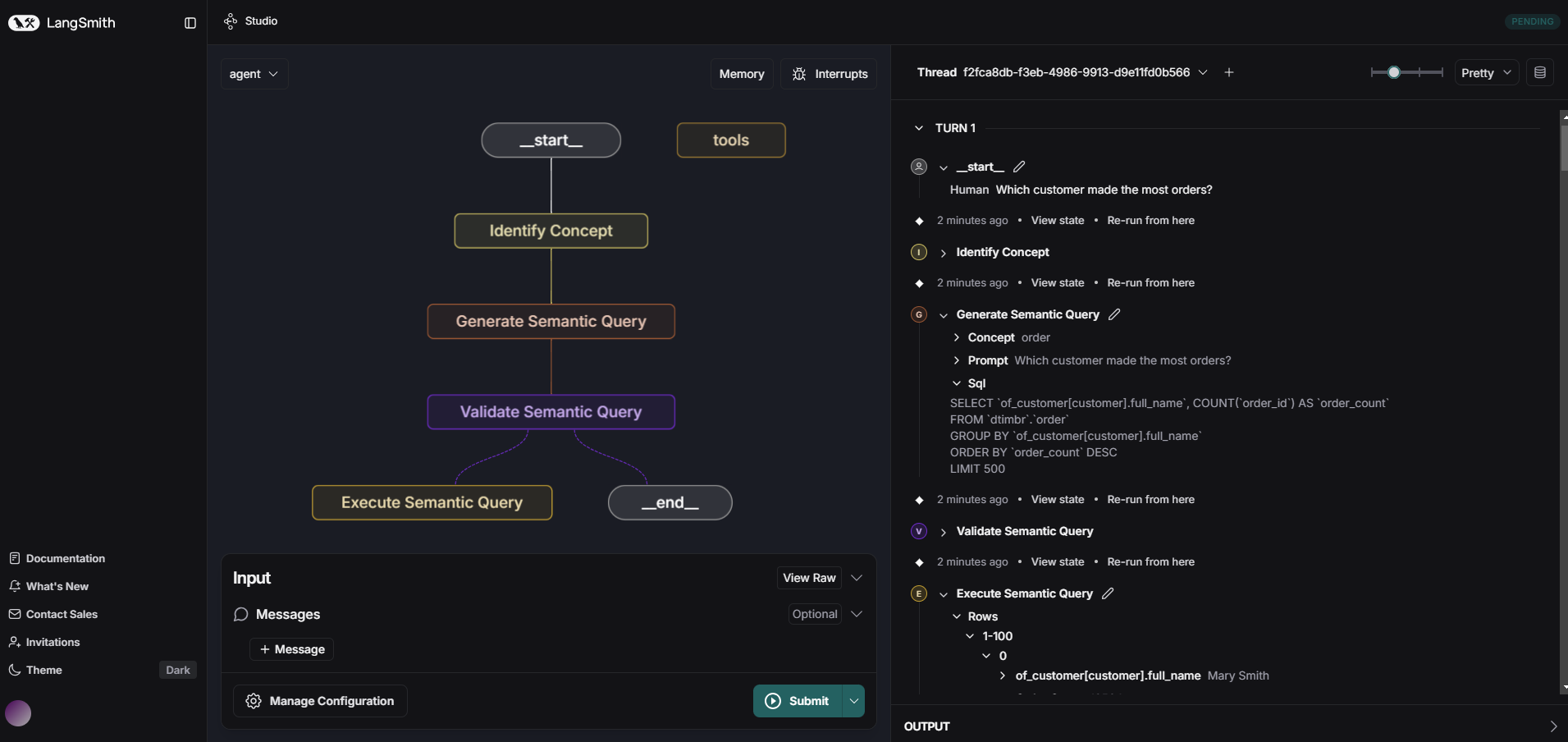
The Timbr LangGraph SDK integrates natural language inputs with Timbr's ontology-driven semantic layer. Leveraging Timbr's robust ontology capabilities, the SDK integrates with Timbr data models and leverages semantic relationships and annotations, enabling users to query data in a business-friendly language.
It leverages Large Language Models (LLMs) to interpret user queries, generate Timbr SQL, and fetch query results from the database, enabling seamless interaction with any database connected to Timbr.
The SDK translates user questions into Timbr SQL, automatically aligning with the ontology's structure. This ensures context-aware results that reflect the underlying semantic relationships.
Requirements
To use this SDK, ensure you have the following:
Python Version: Python 3.9.13
Required Dependencies:
langchain==0.3.25
langchain_community==0.3.20
langgraph==0.3.20
pytimbr-api>=1.0.8
pydantic==2.10.4
Optional Dependencies (Depending on LLM):
langchain-anthropic==0.3.1
anthropic==0.42.0
langchain-openai==0.3.16
openai==1.77.0
Installation
Using pip
python -m pip install langchain-timbr
Install with selected LLM providers
One of: openai, anthropic, google, azure_openai, snowflake, databricks, vertex_ai, bedrock (or 'all')
python -m pip install 'langchain-timbr[<your selected providers, separated by comma w/o space>]'
Configuration
All chains, agents, and nodes support optional environment-based configuration. You can set the following environment variables to provide default values and have easy setup for the provided tools:
Timbr Connection Variables:
- TIMBR_URL: Default Timbr server URL
- TIMBR_TOKEN: Default Timbr authentication token
- TIMBR_ONTOLOGY or ONTOLOGY: Default ontology/knowledge graph name
When these environment variables are set, the corresponding parameters (url, token, ontology) become optional in all chain and agent constructors and will use the environment values as defaults.
LLM Configuration Variables:
- LLM_TYPE: Type of LLM to use (e.g., "openai", "anthropic", "azure_openai", "google", "snowflake", "databricks", "chat-vertexai", "amazon_bedrock_converse_chat", "timbr")
- LLM_API_KEY: API key for the LLM provider
- LLM_MODEL: Model name to use (e.g., "gpt-4o", "claude-3-5-sonnet-20241022")
- LLM_TEMPERATURE: Temperature setting for the LLM (default: 0.1)
- LLM_ADDITIONAL_PARAMS: Additional parameters as JSON string (e.g., '{"max_tokens": 1000}')
When LLM environment variables are set, the llm parameter becomes optional and will use the LlmWrapper with environment configuration.
Example environment setup:
# Timbr connection
export TIMBR_URL="https://your-timbr-app.com/"
export TIMBR_TOKEN="tk_XXXXXXXXXXXXXXXXXXXXXXXX"
export TIMBR_ONTOLOGY="timbr_knowledge_graph"

# LLM configuration
export LLM_TYPE="openai-chat"
export LLM_API_KEY="your-openai-api-key"
export LLM_MODEL="gpt-4o"
export LLM_TEMPERATURE="0.1"
export LLM_ADDITIONAL_PARAMS='{"max_tokens": 1000}'
Features
- Multi-LLM Support: Integrates with OpenAI GPT, Anthropic Claude, Google Gemini, Databricks DBRX/llama, Snowflake Cortex, Google VertexAI, AWS Bedrock and Timbr's native LLM (or any custom LLM using the LangChain interface)
- SQL Generation: Generate semantic SQL queries (ontology enriched queries).
- Knowledge Graph Access: Interact with ontologies in natural language and retrieve context-aware answers.
- Streamlined Querying: Combine natural language inputs with timbr using simple methods like
run_llm_query.
LangGraph interface
Identify Concept Node
Wraps the IdentifyTimbrConceptChain functionality to identify the relevant concept (and schema) based on the latest message in the state object.
Parameters:
| Parameter | Type / Default | Description |
|---|---|---|
| llm | LLM Default: None Optional | Language model instance (or a function taking a prompt string and returning an LLM's response). If None, uses LlmWrapper with environment variables. |
| url | str Default: None Optional | Timbr server URL. If None, uses the value from the TIMBR_URL environment variable. |
| token | str Default: None Optional | Timbr authentication token. If None, uses the value from the TIMBR_TOKEN environment variable. |
| ontology | str Default: None Optional | Name of the ontology/knowledge graph. If None, uses the value from the TIMBR_ONTOLOGY or ONTOLOGY environment variable. |
| concepts_list | List[str] or str Default: None Optional | Collection of concepts to include (List of strings, or a string of concept names divided by comma). - If None, empty or '*', all available concepts are used. - If populated, only those concepts will be included in query generation. - If 'none' or 'null', no concepts will be used for the query. |
| views_list | List[str] or str Default: None Optional | Collection of views/cubes to include (List of strings, or a string of view/cube names divided by comma). - If None, empty or '*', all available views/cubes are used. - If populated, only those views/cubes will be included in query generation. - If 'none' or 'null', no views/cubes will be used for the query. |
| include_logic_concepts | bool Default: False Optional | Whether to include logic concepts (concepts without unique properties which only inherit from an upper level concept with filter logic) in the query. Note: This parameter has no effect when concepts_list is provided. |
| include_tags | List[str] or str Default: None Optional | Specific concept/property tag names to consider when generating the query. - If None or empty, no tags are used.- If a single string or list of strings is provided, only those tags (if they exist) will be attached to the prompt. - Use List of strings or a comma-separated string (e.g. 'tag1,tag2') to specify multiple tags.- Use '*' to include all tags. |
| should_validate_sql | bool Default: True Optional | Whether to validate the identified concept before returning it. |
| retries | int Default: 2 Optional | Number of retry attempts if the identified concept is invalid. |
| note | str Default: None Optional | Additional note to extend the LLM prompt. |
| agent | str Default: None Optional | Optional Timbr agent name for options setup. |
| verify_ssl | bool Default: True Optional | Whether to verify SSL certificates. |
| is_jwt | bool Default: False Optional | Whether to use JWT authentication. |
| jwt_tenant_id | str Default: None Optional | Tenant ID for JWT authentication (if applicable). |
| conn_params | dict Default: None Optional | Extra Timbr connection parameters sent with every request (e.g., 'x-api-impersonate-user'). |
Usage Example:
from langgraph.graph import StateGraph
from langchain_timbr import IdentifyConceptNode

llm_instance = <your_llm_instance>  # Replace with your actual LLM instance (optional)
identify_node = IdentifyConceptNode(
    llm=llm_instance,  # optional: uses LlmWrapper with env vars if not specified
    # url, token, ontology are optional if environment variables are set
    url="https://your-timbr-app.com/",  # optional: uses TIMBR_URL if not specified
    token="tk_XXXXXXXXXXXXXXXXXXXXXXXX",  # optional: uses TIMBR_TOKEN if not specified
    ontology="timbr_knowledge_graph",  # optional: uses TIMBR_ONTOLOGY/ONTOLOGY if not specified
    concepts_list=["Sales", "Orders"],
    views_list=["sales_view"]
)

state = StateGraph(dict)
state.messages = [{"content": "What are the total sales for last month?"}]

output = identify_node(state)
print("Identified Concept:", output)
Generate SQL Node
Wraps the GenerateTimbrSqlChain functionality to generate SQL from a natural language prompt. Expects the state to include a prompt and returns a payload containing the generated SQL, schema, and concept.
Parameters:
| Parameter | Type / Default | Description |
|---|---|---|
| llm | LLM Default: None Optional | Language model instance (or a function taking a prompt string and returning an LLM's response). If None, uses LlmWrapper with environment variables. |
| url | str Default: None Optional | Timbr server URL. If None, uses the value from the TIMBR_URL environment variable. |
| token | str Default: None Optional | Timbr authentication token. If None, uses the value from the TIMBR_TOKEN environment variable. |
| ontology | str Default: None Optional | Name of the ontology/knowledge graph. If None, uses the value from the TIMBR_ONTOLOGY or ONTOLOGY environment variable. |
| schema | str Default: None Optional | Name of the schema to query. |
| concept | str Default: None Optional | Name of a specific concept to query. |
| concepts_list | List[str] or str Default: None Optional | Collection of concepts to include (List of strings, or a string of concept names divided by comma). - If None, empty or '*', all available concepts are used. - If populated, only those concepts will be included in query generation. - If 'none' or 'null', no concepts will be used for the query. |
| views_list | List[str] or str Default: None Optional | Collection of views/cubes to include (List of strings, or a string of view/cube names divided by comma). - If None, empty or '*', all available views/cubes are used. - If populated, only those views/cubes will be included in query generation. - If 'none' or 'null', no views/cubes will be used for the query. |
| include_logic_concepts | bool Default: False Optional | Whether to include logic concepts (concepts without unique properties which only inherit from an upper level concept with filter logic) in the query. Note: This parameter has no effect when concepts_list is provided. |
| include_tags | List[str] or str Default: None Optional | Specific concept/property tag names to consider when generating the query. - If None or empty, no tags are used.- If a single string or list of strings is provided, only those tags (if they exist) will be attached to the prompt. - Use List of strings or a comma-separated string (e.g. 'tag1,tag2') to specify multiple tags.- Use '*' to include all tags. |
| exclude_properties | List[str] or str Default: None Optional | Collection of properties to exclude from the query (List of strings, or a string of property names divided by comma. entity_id, entity_type & entity_label are excluded by default). |
| should_validate_sql | bool Default: True Optional | Whether to validate the SQL before executing it. |
| retries | int Default: 2 Optional | Number of retry attempts if the generated SQL is invalid. |
| max_limit | int Default: 100 Optional | Maximum number of rows to return. |
| note | str Default: None Optional | Additional note to extend the LLM prompt. |
| db_is_case_sensitive | bool Default: False Optional | Whether the database is case sensitive. |
| graph_depth | int Default: 1 Optional | Maximum number of relationship hops to traverse from the source concept during schema exploration. |
| enable_reasoning | bool Default: False Optional | Whether to enable reasoning during SQL generation. |
| reasoning_steps | int Default: 2 Optional | Number of reasoning steps to perform if reasoning is enabled. |
| agent | str Default: None Optional | Optional Timbr agent name for options setup. |
| verify_ssl | bool Default: True Optional | Whether to verify SSL certificates. |
| is_jwt | bool Default: False Optional | Whether to use JWT authentication. |
| jwt_tenant_id | str Default: None Optional | Tenant ID for JWT authentication (if applicable). |
| conn_params | dict Default: None Optional | Extra Timbr connection parameters sent with every request (e.g., 'x-api-impersonate-user'). |
Usage Example:
from langgraph.graph import StateGraph
from langchain_timbr import GenerateTimbrSqlNode

llm_instance = <your_llm_instance>  # Replace with your actual LLM instance (optional)
generate_sql_node = GenerateTimbrSqlNode(
    llm=llm_instance,  # optional: uses LlmWrapper with env vars if not specified
    # url, token, ontology are optional if environment variables are set
    url="https://your-timbr-app.com/",  # optional: uses TIMBR_URL if not specified
    token="tk_XXXXXXXXXXXXXXXXXXXXXXXX",  # optional: uses TIMBR_TOKEN if not specified
    ontology="timbr_knowledge_graph",  # optional: uses TIMBR_ONTOLOGY/ONTOLOGY if not specified
    schema="dtimbr",
    concept="Sales"
)

state = StateGraph(dict)
state.messages = [{"content": "What are the total sales for last month?"}]

output = generate_sql_node(state)
print("Generated SQL Node Output:", output)
Validate Semantic SQL Node
Wraps the ValidateTimbrSqlChain functionality to validate (and optionally adjust) a generated SQL query. Expects the state to include a sql and/or prompt, and returns the validated SQL, its validity status, and any error.
Parameters:
| Parameter | Type / Default | Description |
|---|---|---|
| llm | LLM Default: None Optional | Language model instance (or a function taking a prompt string and returning an LLM's response). If None, uses LlmWrapper with environment variables. |
| url | str Default: None Optional | Timbr server URL. If None, uses the value from the TIMBR_URL environment variable. |
| token | str Default: None Optional | Timbr authentication token. If None, uses the value from the TIMBR_TOKEN environment variable. |
| ontology | str Default: None Optional | Name of the ontology/knowledge graph. If None, uses the value from the TIMBR_ONTOLOGY or ONTOLOGY environment variable. |
| schema | str Default: None Optional | Name of the schema to query. |
| concept | str Default: None Optional | Name of a specific concept to query. |
| retries | int Default: 2 Optional | Number of retry attempts if the generated SQL is invalid. |
| concepts_list | List[str] or str Default: None Optional | Collection of concepts to include (List of strings, or a string of concept names divided by comma). - If None, empty or '*', all available concepts are used. - If populated, only those concepts will be included in query generation. - If 'none' or 'null', no concepts will be used for the query. |
| views_list | List[str] or str Default: None Optional | Collection of views/cubes to include (List of strings, or a string of view/cube names divided by comma). - If None, empty or '*', all available views/cubes are used. - If populated, only those views/cubes will be included in query generation. - If 'none' or 'null', no views/cubes will be used for the query. |
| include_logic_concepts | bool Default: False Optional | Whether to include logic concepts (concepts without unique properties which only inherit from an upper level concept with filter logic) in the query. Note: This parameter has no effect when concepts_list is provided. |
| include_tags | List[str] or str Default: None Optional | Specific concept/property tag names to consider when generating the query. - If None or empty, no tags are used.- If a single string or list of strings is provided, only those tags (if they exist) will be attached to the prompt. - Use List of strings or a comma-separated string (e.g. 'tag1,tag2') to specify multiple tags.- Use '*' to include all tags. |
| exclude_properties | List[str] or str Default: None Optional | Collection of properties to exclude from the query (List of strings, or a string of property names divided by comma. entity_id, entity_type & entity_label are excluded by default). |
| max_limit | int Default: 100 Optional | Maximum number of rows to return. |
| note | str Default: None Optional | Additional note to extend the LLM prompt. |
| db_is_case_sensitive | bool Default: False Optional | Whether the database is case sensitive. |
| graph_depth | int Default: 1 Optional | Maximum number of relationship hops to traverse from the source concept during schema exploration. |
| enable_reasoning | bool Default: False Optional | Whether to enable reasoning during SQL generation. |
| reasoning_steps | int Default: 2 Optional | Number of reasoning steps to perform if reasoning is enabled. |
| agent | str Default: None Optional | Optional Timbr agent name for options setup. |
| verify_ssl | bool Default: True Optional | Whether to verify SSL certificates. |
| is_jwt | bool Default: False Optional | Whether to use JWT authentication. |
| jwt_tenant_id | str Default: None Optional | Tenant ID for JWT authentication (if applicable). |
| conn_params | dict Default: None Optional | Extra Timbr connection parameters sent with every request (e.g., 'x-api-impersonate-user'). |
Usage Example:
from langgraph.graph import StateGraph
from langchain_timbr import ValidateSemanticSqlNode

llm_instance = <your_llm_instance>  # Replace with your actual LLM instance (optional)
validate_sql_node = ValidateSemanticSqlNode(
    llm=llm_instance,  # optional: uses LlmWrapper with env vars if not specified
    # url, token, ontology are optional if environment variables are set
    url="https://your-timbr-app.com/",  # optional: uses TIMBR_URL if not specified
    token="tk_XXXXXXXXXXXXXXXXXXXXXXXX",  # optional: uses TIMBR_TOKEN if not specified
    ontology="timbr_knowledge_graph",  # optional: uses TIMBR_ONTOLOGY/ONTOLOGY if not specified
    schema="dtimbr",
    concept="Sales",
    retries=3
)

state = StateGraph(dict)
state.sql = "SELECT SUM(amount) FROM sales WHERE date > current_date - INTERVAL '1 month'"
state.prompt = "What are the total sales for last month?"

output = validate_sql_node(state)
print("Validated SQL Node Output:", output)
Execute Semantic SQL Node
Wraps the ExecuteTimbrQueryChain functionality to execute the generated SQL query. Expects the state to include a prompt and returns the query result rows.
Parameters:
| Parameter | Type / Default | Description |
|---|---|---|
| llm | LLM Default: None Optional | Language model instance (or a function taking a prompt string and returning an LLM's response). If None, uses LlmWrapper with environment variables. |
| url | str Default: None Optional | Timbr server URL. If None, uses the value from the TIMBR_URL environment variable. |
| token | str Default: None Optional | Timbr authentication token. If None, uses the value from the TIMBR_TOKEN environment variable. |
| ontology | str Default: None Optional | Name of the ontology/knowledge graph. If None, uses the value from the TIMBR_ONTOLOGY or ONTOLOGY environment variable. |
| schema | str Default: None Optional | Name of the schema to query. |
| concept | str Default: None Optional | Name of a specific concept to query. |
| concepts_list | List[str] or str Default: None Optional | Collection of concepts to include (List of strings, or a string of concept names divided by comma). - If None, empty or '*', all available concepts are used. - If populated, only those concepts will be included in query generation. - If 'none' or 'null', no concepts will be used for the query. |
| views_list | List[str] or str Default: None Optional | Collection of views/cubes to include (List of strings, or a string of view/cube names divided by comma). - If None, empty or '*', all available views/cubes are used. - If populated, only those views/cubes will be included in query generation. - If 'none' or 'null', no views/cubes will be used for the query. |
| include_logic_concepts | bool Default: False Optional | Whether to include logic concepts (concepts without unique properties which only inherit from an upper level concept with filter logic) in the query. Note: This parameter has no effect when concepts_list is provided. |
| include_tags | List[str] or str Default: None Optional | Specific concept/property tag names to consider when generating the query. - If None or empty, no tags are used.- If a single string or list of strings is provided, only those tags (if they exist) will be attached to the prompt. - Use List of strings or a comma-separated string (e.g. 'tag1,tag2') to specify multiple tags.- Use '*' to include all tags. |
| exclude_properties | List[str] or str Default: None Optional | Collection of properties to exclude from the query (List of strings, or a string of property names divided by comma. entity_id, entity_type & entity_label are excluded by default). |
| should_validate_sql | bool Default: True Optional | Whether to validate the SQL before executing it. |
| retries | int Default: 2 Optional | Number of retry attempts if the generated SQL is invalid. |
| max_limit | int Default: 100 Optional | Maximum number of rows to return. |
| retry_if_no_results | bool Default: True Optional | Whether to infer the result value from the SQL query. If the query won't return any rows, it will try to re-generate the SQL query then re-run it. |
| no_results_max_retries | int Default: 2 Optional | Number of retry attempts to infer the result value from the SQL query. |
| note | str Default: None Optional | Additional note to extend the LLM prompt. |
| db_is_case_sensitive | bool Default: False Optional | Whether the database is case sensitive. |
| graph_depth | int Default: 1 Optional | Maximum number of relationship hops to traverse from the source concept during schema exploration. |
| enable_reasoning | bool Default: False Optional | Whether to enable reasoning during SQL generation. |
| reasoning_steps | int Default: 2 Optional | Number of reasoning steps to perform if reasoning is enabled. |
| agent | str Default: None Optional | Optional Timbr agent name for options setup. |
| verify_ssl | bool Default: True Optional | Whether to verify SSL certificates. |
| is_jwt | bool Default: False Optional | Whether to use JWT authentication. |
| jwt_tenant_id | str Default: None Optional | Tenant ID for JWT authentication (if applicable). |
| conn_params | dict Default: None Optional | Extra Timbr connection parameters sent with every request (e.g., 'x-api-impersonate-user'). |
Usage Example:
from langgraph.graph import StateGraph
from langchain_timbr import ExecuteSemanticQueryNode

llm_instance = <your_llm_instance>  # Replace with your actual LLM instance (optional)
execute_query_node = ExecuteSemanticQueryNode(
    llm=llm_instance,  # optional: uses LlmWrapper with env vars if not specified
    # url, token, ontology are optional if environment variables are set
    url="https://your-timbr-app.com/",  # optional: uses TIMBR_URL if not specified
    token="tk_XXXXXXXXXXXXXXXXXXXXXXXX",  # optional: uses TIMBR_TOKEN if not specified
    ontology="timbr_knowledge_graph",  # optional: uses TIMBR_ONTOLOGY/ONTOLOGY if not specified
    schema="dtimbr",
    concept="Sales"
)

state = StateGraph(dict)
state.messages = [{"content": "What are the total sales for last month?"}]

output = execute_query_node(state)
print("Query Execution Rows:", output)
Generate Response Node
Wraps the GenerateAnswerChain functionality to answer based on the prompt and query results.
Parameters:
| Parameter | Type / Default | Description |
|---|---|---|
| llm | LLM Default: None Optional | Language model instance (or a function taking a prompt string and returning an LLM's response). If None, uses LlmWrapper with environment variables. |
| url | str Default: None Optional | Timbr server URL. If None, uses the value from the TIMBR_URL environment variable. |
| token | str Default: None Optional | Timbr authentication token. If None, uses the value from the TIMBR_TOKEN environment variable. |
| agent | str Default: None Optional | Optional Timbr agent name for options setup. |
| verify_ssl | bool Default: True Optional | Whether to verify SSL certificates. |
| is_jwt | bool Default: False Optional | Whether to use JWT authentication. |
| jwt_tenant_id | str Default: None Optional | Tenant ID for JWT authentication (if applicable). |
| conn_params | dict Default: None Optional | Extra Timbr connection parameters sent with every request (e.g., 'x-api-impersonate-user'). |
| note | str Default: None Optional | Additional note to extend the LLM prompt. |
Usage Example:
from langgraph.graph import StateGraph
from langchain_timbr import GenerateResponseNode

llm_instance = <your_llm_instance>  # Replace with your actual LLM instance (optional)
response_node = GenerateResponseNode(
    llm=llm_instance,  # optional: uses LlmWrapper with env vars if not specified
    # url, token are optional if environment variables are set
    url="https://your-timbr-app.com/",  # optional: uses TIMBR_URL if not specified
    token="tk_XXXXXXXXXXXXXXXXXXXXXXXX",  # optional: uses TIMBR_TOKEN if not specified
)

state = StateGraph(dict)
state.prompt = "Summarize last month total sales"
state.sql = "SELECT SUM(amount) FROM sales WHERE date > current_date - INTERVAL '1 month'"
state.schema = "dtimbr"
state.concept = "Sales"
state.rows = [{"total_sales": 1250000}]

output = response_node(state)
print("Generated Response:", output)
Examples
Explore the examples/ directory for detailed use cases, including:
- Streamlit Integration: Build a user-friendly app to query Timbr interactively.
- LangGraph Nodes: Use
GenerateTimbrSqlNodeandExecuteTimbrQueryNode& more, for more granular control. - Custom Nodes: Create custom timbr nodes to handle complex workflows.
Timbr Methods Overview
get_ontologies
Fetch a list of available knowledge graphs in the Timbr environment.
ontologies_list = llm_connector.get_ontologies()
set_ontology
Set or switch the ontology for subsequent operations.
llm_connector.set_ontology("<ontology_name>")
determine_concept
Use the LLM to determine the appropriate concept and schema for a query.
concept_name, schema_name = llm_connector.determine_concept("Show me sales by region.")
generate_sql
Generate Timbr SQL for a user query.
sql_query = llm_connector.generate_sql("What is the revenue by product category?", concept_name="sales_data")
validate_sql
Validates Timbr SQL.
is_sql_valid, error = llm_connector.validate_sql("What is the revenue by product category?", sql_query="SELECT SUM(revenue) FROM sales GROUP BY product_category")
run_timbr_query
Run a Timbr SQL query and fetch results.
results = llm_connector.run_timbr_query("SELECT * FROM sales_data")
run_llm_query
Combine SQL generation and execution in a single step.
response = llm_connector.run_llm_query("What are the top 5 products by sales?")