Databricks Connection
Connecting from Retool to Timbr Using Databricks Connector
Open Retool and go to the Resources tab, click on Create new and select Resource
In the Databases category select Databricks
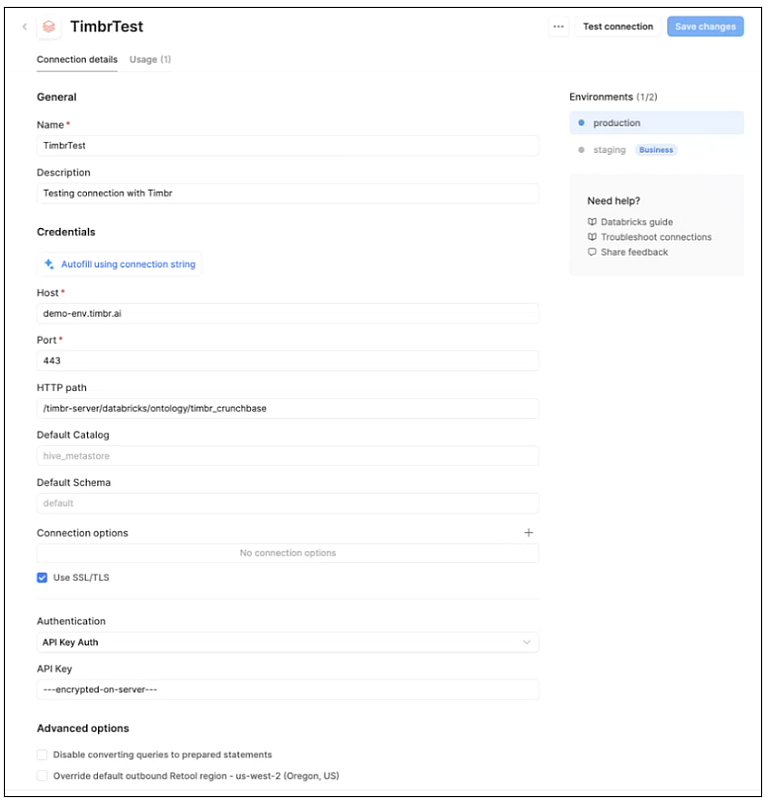
In the configuration window, enter the following values (reference image below):
General
- Name: The name of this resource in Retool
- Description: Information about the resource
Credentials
- Host: The Timbr environment URL without HTTP/HTTPS
- Port: The port of the Timbr environment
- HTTP path:
/timbr-server/databricks/ontology/ontology_name(copy the path and change the ontology name) - Default Catalog: Leave empty
- Default Schema: Leave empty
- Connection options: If SSL is enabled you can leave it as is. If there is no SSL in the Timbr environment, add a new option called SSL (uppercase only) and in the value field write
0 - Use SSL/TLS: Mark checkbox if SSL enabled, unmark if not enabled
- Authentication: Select API Key Auth method and paste your Timbr token as the value
- Click on Test connection and Save. If the test failed, please follow the error message on Retool and verify the correct values.